

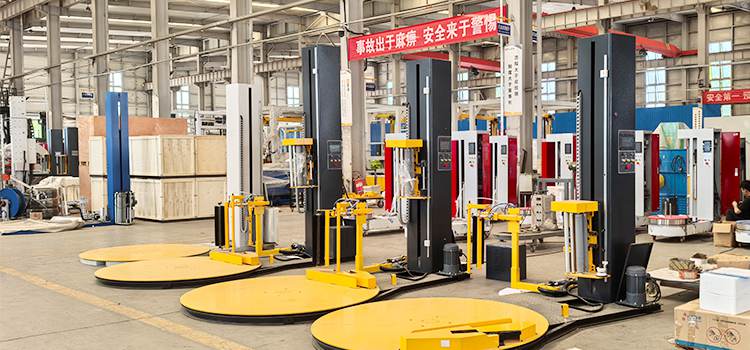
For manufacturing and distribution facilities, even 30 minutes of downtime on a single wrapper can cost **500–2,000 in lost productivity**, depending on line throughput. This guide walks you through the 12 most common pallet wrapper problems, their root causes, and step-by-step fixes — so you can get your line back up quickly and prevent recurrence.
Whether you operate a turntable stretch wrapper, rotary arm machine, or horizontal orbital wrapper, many troubleshooting principles apply across machine types. Shandong Dyehome Intelligent Equipment Co., Ltd. has manufactured industrial stretch wrapping systems for over 20 years, and our service engineers have compiled this troubleshooting playbook based on thousands of field service calls across 50+ countries.
Top 12 Common Pallet Wrapper Problems & Solutions
1. Film Breaks During Wrapping Cycle
The Problem: Stretch film snaps mid-wrap, leaving the load partially wrapped and forcing an operator to restart the cycle.
Root Causes & Fixes:
Cause Solution Difficulty
Film tension set too high Reduce tension settings on the film carriage. Start with 10-15% reduction and test. Easy
Damaged or dull film rollers Inspect rollers for nicks, burrs, or wear. Replace rollers or polish surfaces. Medium
Poor quality film Upgrade to higher-grade machine film (minimum 20μm thickness) with proper puncture resistance. Easy
Sharp edges on load Add edge protectors or reduce wrap force on the first 1-2 layers. Easy
Pre-stretch ratio set beyond film capability Lower pre-stretch from 300% to 250% or 200%. Verify film specs with your supplier. Easy
Preventive Tip: Film breaks account for roughly 35% of all pallet wrapper service calls. Conduct a weekly film path inspection — clean rollers, check for debris, and verify tension settings match your film grade.
2. Turntable Not Turning or Rotating Slowly
The Problem: The turntable fails to start, rotates intermittently, or turns slower than the programmed speed.
Root Causes & Fixes:
Overloaded turntable: Check the load weight against the machine's rated capacity. Standard turntable wrappers handle 1,500–2,000 kg; exceeding this damages the drive system. Reduce load weight or upgrade to a higher-capacity model.
Worn drive chain or belt: Inspect the drive mechanism for slack, wear, or damage. Tighten or replace the chain/belt and lubricate sprockets.
Faulty motor or VFD: If the turntable doesn't move at all, check the variable frequency drive (VFD) for error codes. A humming motor without rotation often indicates a VFD fault or capacitor failure — call a service technician.
Obstructed rotation: Clear debris, strapping band fragments, or shrink wrap residue from under the turntable and around the perimeter.
Dyehome Insight: Our turntable wrappers use a direct-drive gear motor system that eliminates chain maintenance issues entirely — a common upgrade request from facilities fed up with repeated turntable drive failures.
3. Film Not Stretching Properly (Low Pre-Stretch)
The Problem: The film appears barely stretched, you're using more film than expected, or the wrap feels loose despite correct tension settings.
Root Causes & Fixes:
Pre-stretch rollers slipping: The pre-stretch carriage relies on friction between rollers and film. If rollers are worn, oily, or glazed with film residue, they slip instead of stretching. Clean rollers with isopropyl alcohol and replace if surface hardness is compromised.
Incorrect pre-stretch setting: Verify the pre-stretch ratio in the control panel. Common settings are 200%, 250%, and 300%. If unsure, start at 200% and increase gradually while monitoring film integrity.
Film roll not seated properly: Ensure the film roll is mounted firmly on the core holder. A loose roll causes slippage before the film even reaches the pre-stretch rollers.
Worn pre-stretch bearings: If the rollers have play or wobble, the bearing assemblies need replacement. This is a medium-difficulty repair that typically requires a service visit.
4. Uneven Film Tension / Loose Wraps
The Problem: Some parts of the load are tight while others are loose, or the entire wrap feels slack — risking load shift during transit.
Root Causes & Fixes:
Photo eye misalignment: The load height sensor (photo eye) may be reading incorrectly, causing uneven top and bottom wraps. Clean the photo eye lens and realign according to the manual.
Film tension ramping not set correctly: Modern wrappers allow different tension settings at the bottom, middle, and top of the load. If bottom wraps are loose, increase bottom wrap tension by 10-15%.
Load shifting on turntable: If the pallet isn't centered or the load is unstable, centrifugal force causes uneven wrapping. Use a turntable with pallet centering guides or add a conical roller for self-centering.
Wind vs. unwind speed mismatch: If the film carriage moves up/down at a speed that doesn't match the turntable RPM, you'll get inconsistent wrap overlap. Check the ratio settings in the control panel.
5. Film Carriage Not Moving Up or Down
The Problem: The mast carriage stays at the bottom (or top) and won't traverse, resulting in all film applied to a single horizontal band.
Root Causes & Fixes:
Limit switch fault: The upper or lower limit switch may be stuck or damaged. Manually test both switches and replace if faulty. This is a common issue — limit switches are wear items that typically need replacement every 2-3 years.
Mast chain slack or breakage: Check the mast drive chain for proper tension. A broken chain requires immediate replacement and is a safety hazard — never operate the machine with a compromised mast chain.
Mast motor failure: If you hear no motor sound when the carriage should move, test the mast drive motor and its controller. Motor failures are less common but do occur, especially in dusty or corrosive environments.
Obstruction in mast guides: Inspect the carriage guide rails for debris, film scraps, or damaged bearings. Clean and lubricate the guide rails monthly.
6. Film Not Cutting or Clamping Properly
The Problem: At the end of the wrap cycle, the film doesn't cut cleanly, or the clamp doesn't hold the film tail for the next load.
Root Causes & Fixes:
Dull cutting blade: The hot wire or mechanical cutter becomes dull or contaminated with film residue over time. Clean or replace the cutting element — this is one of the most frequently replaced wear parts on automatic wrappers.
Clamp pad wear: The rubber or foam clamp pad that grips the film tail wears down. Replace clamp pads when they show visible wear or when you notice film slipping.
Incorrect film tail length: If the film tail is too short, the clamp can't grip it properly. Adjust the tail length setting in the control panel — typically 300–500 mm is optimal.
Pneumatic pressure issues (for pneumatic cutters/clamps): Check air pressure (should be 0.5–0.7 MPa / 70–100 PSI). Inspect air lines for leaks and the solenoid valve for proper operation.
7. Wrapping Pattern Inconsistent
The Problem: Sometimes loads get 3 wraps, sometimes 5; top and bottom overlap varies randomly despite same settings.
Root Causes & Fixes:
Incorrect photo eye sensitivity: The load height sensor may be triggering at different heights due to varying load shapes, reflective surfaces, or dust on the lens. Clean the lens and adjust sensitivity settings. For mixed-load operations, consider an ultrasonic sensor upgrade.
Turntable speed variation: If turntable RPM fluctuates due to voltage issues or motor wear, wrap count per vertical layer changes. Check power supply stability and motor performance.
Mast speed variation: Similarly, if the film carriage moves at inconsistent speeds, overlap percentages shift. Inspect mast drive and VFD parameters.
Manual mode interruptions: If operators are manually pausing or adjusting cycles, consistency is impossible. Standardize your wrap recipes and use auto-start (with photo eye or fork sensor triggering) for fully consistent results.
Dyehome Solution: Our PLC-controlled wrappers store up to 10 different wrap recipes for different load types, ensuring perfect consistency every cycle — no operator variation.
8. Load Damage from Over-Tightening
The Problem: Pallet loads show crushed corners, deformed packaging, or even product damage from excessive film tension.
Root Causes & Fixes:
Film tension way too high: Reduce overall tension settings. Start with a 20% reduction and test load stability. Remember: the goal is containment, not compression.
No force-to-load technology: Basic wrappers apply constant tension regardless of load shape, causing high force on corners. Upgrading to a machine with variable force control (adjusting tension based on load profile) can reduce corner damage by up to 60%.
Wrong film type: If you're using high-stiffness film on delicate loads, switch to a more elastic film grade. Softer films conform better without crushing.
Excessive wrap overlap: More wraps = more total force. If you're running 200% overlap on light loads, reduce to 50-100% overlap and verify load stability with a tilt or drop test.
9. Machine Stops Mid-Cycle
The Problem: The wrapper starts the cycle normally but shuts down partway through, often with an error code on the display.
Root Causes & Fixes:
Safety interlock triggered: Most modern wrappers have safety features (light curtains, safety gates, emergency stops) that halt operation if triggered. Check that all safety guards are closed and nothing is breaking the light curtain. Reset per the manual.
Overload protection tripped: If the machine draws too much current (e.g., from a jammed turntable or seized motor), the overload relay trips. Clear the obstruction and reset the relay. If it trips repeatedly, investigate the underlying cause.
PLC or controller error: Note the error code on the display and refer to the manual's error code section. Common codes relate to sensor faults, motor overloads, or communication errors between components.
Power supply interruption: Check for loose power connections, tripped breakers, or voltage fluctuations. Industrial environments with heavy machinery can experience voltage sags that disrupt sensitive electronics — consider a line conditioner or UPS for critical wrapping stations.
10. Excessive Film Waste
The Problem: Film consumption is higher than expected, with scraps, tailings, and rejected wraps adding to material costs.
Root Causes & Fixes:
Cause Est. Waste Impact Solution
Wrong film thickness 15-30% Downgauge if current film is over-specified for your loads
Excessive wrap overlap 10-25% Reduce overlap from 200% to 50-100% (test stability first)
Film breaks / re-wraps 5-20% Fix film break root causes (see Problem #1)
Manual film threading waste 5-10% Upgrade to auto-threading film carriage
No pre-stretch or low ratio 30-50% Ensure pre-stretch is active and set to 250%+
Cost Impact: For a facility wrapping 100 pallets/day, reducing film usage by just 10% saves approximately **2,000–4,000 per year** in film costs alone.
11. Sensor / Photo Eye Malfunction
The Problem: The machine doesn't detect the load, starts wrapping at the wrong height, or fails to stop at the top.
Root Causes & Fixes:
Dirty or fogged lens: Dust, film dust, and industrial grime accumulate on sensor lenses. Clean with a microfiber cloth and lens cleaner — never use harsh chemicals or abrasives.
Misaligned sensors: Photo eyes need precise alignment. If bumped or vibrated out of position, they won't detect loads correctly. Realign according to the manufacturer's procedure.
Wrong sensor type for the application: Standard photo eyes struggle with transparent, reflective, or very dark loads. Upgrade to ultrasonic or laser sensors for challenging load types.
Wiring issues: Loose connections, damaged cables, or water intrusion in connectors can cause intermittent sensor faults. Inspect wiring harnesses, especially at pivot points and cable tracks.
12. Unusual Noises or Vibrations
The Problem: Grinding, squealing, rattling, or thumping sounds that weren't there before.
Root Causes & Fixes:
Lack of lubrication: Bearings, chains, and guide rails need regular lubrication. Squealing is often a dry bearing — address immediately before it seizes. Follow the lubrication schedule in your maintenance manual.
Loose hardware: Vibrations from operation can loosen bolts over time. Tighten all structural bolts and check for worn vibration dampeners.
Worn bearings: Grinding or rumbling sounds typically indicate failing bearings in the turntable, mast, or film carriage. Identify the source and replace bearings before complete failure.
Turntable out of balance: If the turntable was dropped, impacted, or has uneven wear on support rollers, it can develop a wobble. Check turntable level and roller condition.